
Checklist: before Calypso starts
Her profile, reference photos, sets with a price and a way to pay come first. The Calypso button on her page names the next thing that’s missing.
The tables follow the order in which the Calypso button asks for each thing.
Required before you can turn Calypso on#
Until each of these is done, the Calypso button on her page shows the next one that’s missing. Click it to go and fix that step.
| What | Where | The button says |
|---|---|---|
| Her profile saved, with Creator name, Age, Origin, Lives in (country), Lives in (city), Primary language, Regional flavor (if her primary language is English or Spanish), Time zone and a type of voice | Creators → her Profile | Set up creator |
| Reference photos: 3 to 5 photos of her | Profile → Physical | Add reference photos to turn on Calypso |
| At least 3 collections in the Calypso Library, each with 3 or more sets that are on for 1-on-1 PPV or Mass PPV and hold at least one photo or video Calypso can send. Only the first time you turn Calypso on for her | Content → Calypso Library | Add content, followed by how many collections are ready when VENUZ knows it |
| A way for your agency to pay: a card, credits or a free period | Billing & usage | Add payment method, or Add credits with crypto if your agency only pays with credits |
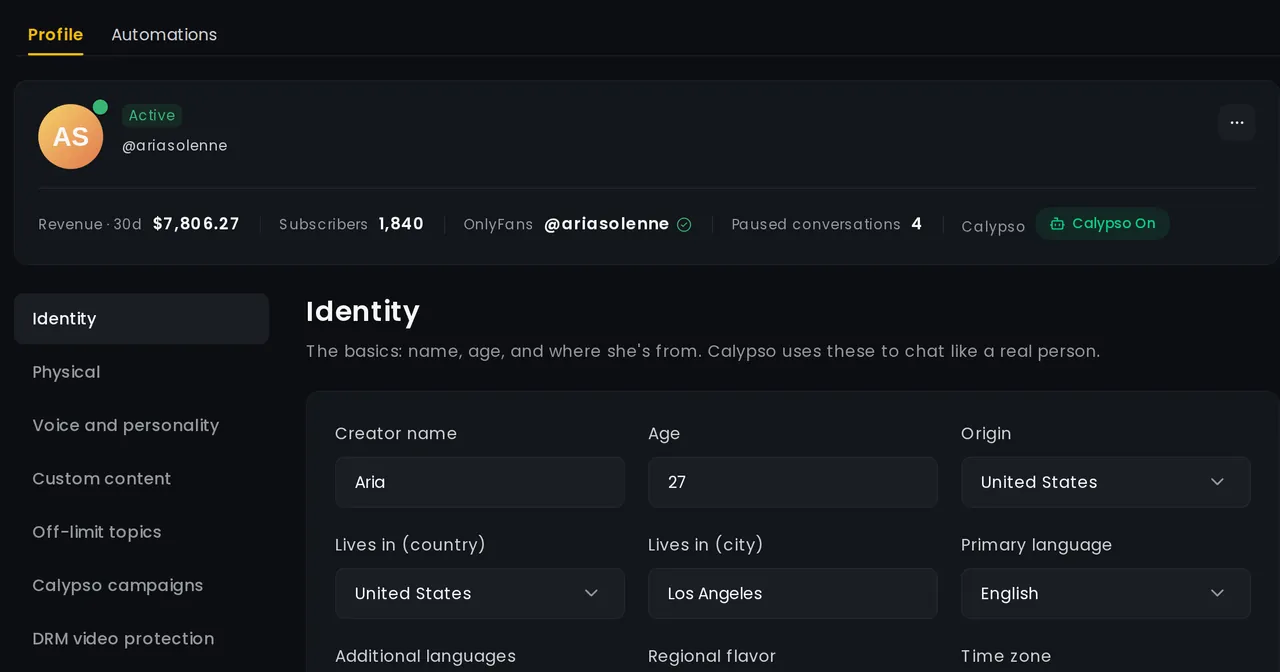
A new creator needs her photos before her profile can be saved. Save checks the whole profile and takes you to the first thing to fix.
Who can turn it on#
- The Turn Calypso on/off permission.
- To fill in her profile and add her photos, the Manage Calypso settings permission. Without it, the button reads Setup pending until someone who has it finishes those steps.
- A verified email address on the account of the person who turns it on.
What Calypso needs to chat#
| What | Where | Why |
|---|---|---|
| Her OnlyFans account linked | Creators → her page → Link OnlyFans account | Calypso chats from her account |
| Her account showing Connected | Her page in Creators | Calypso can’t send messages while it shows Disconnected |
| Content sets with a 1-on-1 minimum price | Content → Calypso Library | A set with no price isn’t for sale, and Calypso can’t send it |
Recommended: what Calypso uses if you fill it in#
| Section | What to add | What Calypso does with it |
|---|---|---|
| Voice and personality | Capitalization, Unique details, Backstory, Account context | Writes the way she texts and stays consistent with her story |
| Physical | A Physical description | Answers when fans ask how she looks |
| Custom content | Offers customs and her custom prices | Takes custom requests at her prices. With it off, turns them all down |
| Custom content | Custom limits | Turns down or redirects a custom she won’t do |
| Off-limit topics | Topic limits | Avoids those subjects with her fans |
| Automations → Filter | Conditions for the fans your team keeps | Leaves those fans to your team |
| Automations → Poke | Turn it on | Reaches out to fans who have gone quiet |
When everything is in place#
The button reads Calypso Off. Click it, check the Activate Calypso window and click Activate. The button changes to Calypso On, and Calypso starts replying to her fans.
To stop Calypso for her later, see Turn Calypso off for a creator, and back on.
Step by step#
Where to go next
Couldn’t send that. Try again.
Still stuck?
Write to us and a person from the VENUZ team answers. Tell us the creator and what you were trying to do.