
What counts as a Calypso sale
A Calypso sale is a PPV Calypso sent in chat that the fan unlocked, or a tip VENUZ credits to Calypso. Subscriptions and tips outside the chat never count.
You see these sales as Calypso earnings in Analytics → Earnings, and as Net Calypso sales on the Calypso leaderboard.
Which PPVs count#
A PPV counts as Calypso’s when Calypso sent it in the chat and the fan unlocked it. A PPV without a price doesn’t count.
It counts on the day the fan unlocks it, not the day Calypso sent it. So a PPV sent last month and unlocked today adds to today.
Which tips count#
A tip can only count as Calypso’s if the fan sends it in the chat while Calypso is on for that creator. The chat must not be taken over or routed to your team. A tip that arrives while your team is handling the chat isn’t Calypso’s.
One of these must also be true:
- Calypso wrote to the fan within 1 hour before the tip.
- The creator’s last message in the 30 days before the tip came from Calypso.
Tips sent outside the chat, such as during a live stream or on a story, never count as Calypso’s.
What never counts#
- New subscriptions and renewals.
- Streams and referrals.
- PPVs and tips your team sold. Those show as Team sales.
- PPVs sent in mass messages or from outside VENUZ.
On the Creators tab, Earnings by seller puts these side by side: Calypso earnings, Team sales and Unattributed, the money nobody sold in chat.
See Calypso’s sales one by one#
- In the Calypso tab, the Sales feed lists Calypso’s PPVs and tips. Filter it by PPV or Tips. Purchased shows the PPVs fans unlocked and the tips. Pending shows the PPVs Calypso sent that are still waiting to be unlocked.
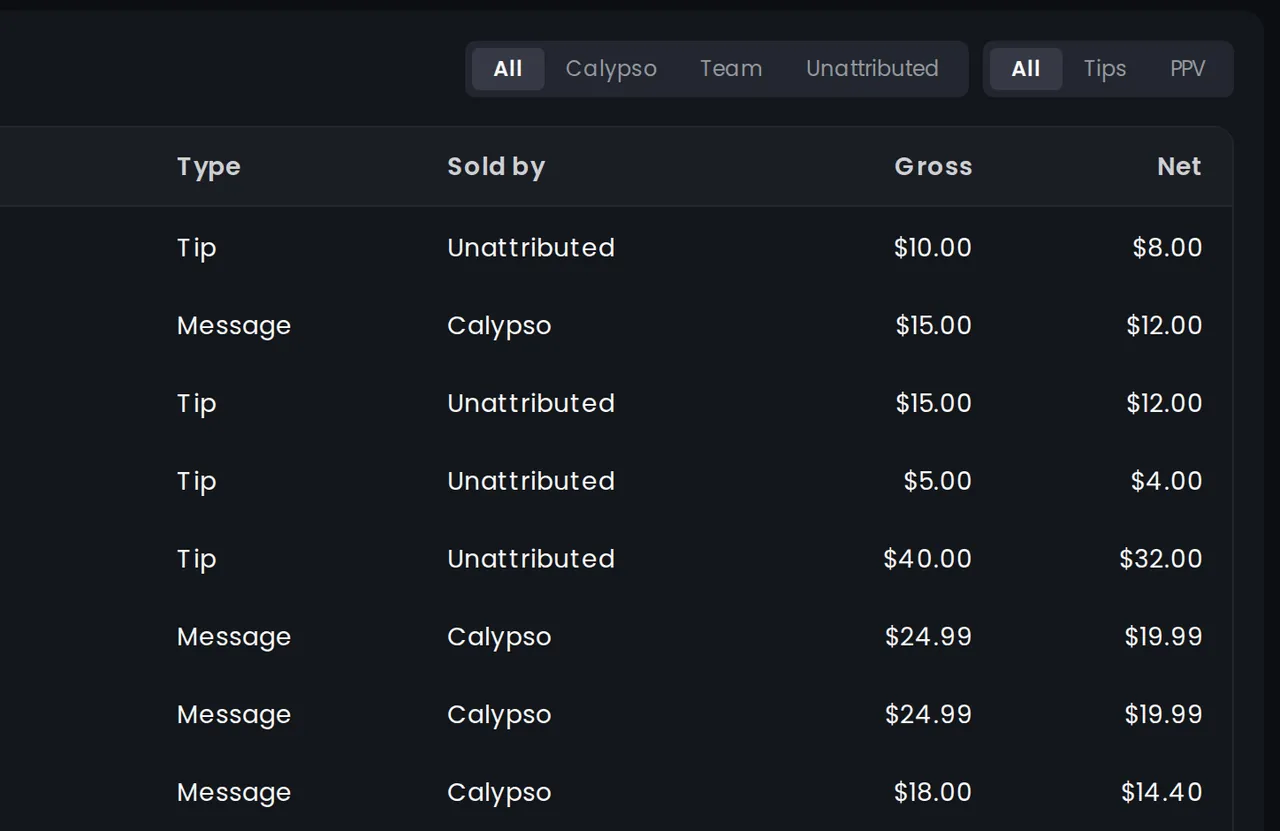
- In the Team tab, Sales lists every tip and PPV with who sold it, if your role can see all analytics. Pick Calypso to keep only Calypso’s. A PPV shows as Message.
Net or gross#
In Analytics → Earnings, Calypso’s figures follow the Net / Gross switch. In Gross, the card reads Calypso earnings (gross). The Calypso leaderboard always ranks agencies by net Calypso sales.
What Net and Gross take into account is explained in Net and gross: why a number differs from OnlyFans.
Unlock rate, Avg reply time and Calypso’s other figures are on the Calypso tab of Analytics → Earnings.
Where to go next
Couldn’t send that. Try again.
Still stuck?
Write to us and a person from the VENUZ team answers. Tell us the creator and what you were trying to do.