
Read your earnings
Analytics → Earnings shows what your creators earned in a period, net or gross, who sold it and which fans spent the most, for one creator or several.
Analytics → Earnings is where you dig into the money behind the Dashboard: one creator, a few, or all of them, for any period. These pages are for a computer or a tablet.
Choose what you see#
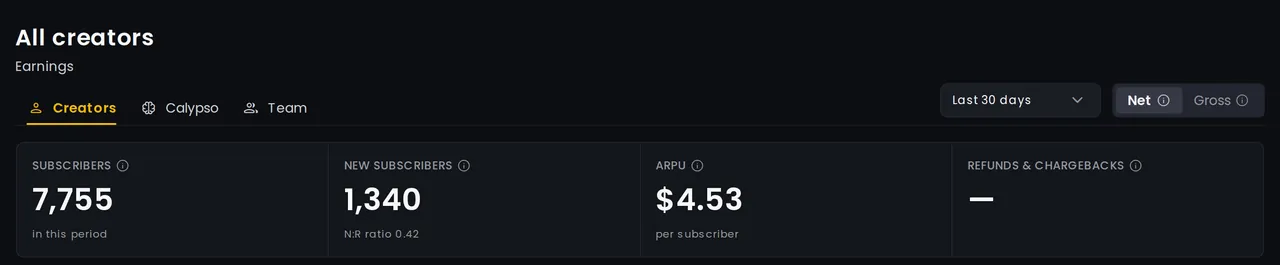
- The list of creators on the left decides whose numbers you see: All creators, one name, or several selected together. The title says who you’re looking at.
- The tabs split the money by who you’re looking at: Creators, Calypso and Team. Your role decides which tabs you see.
- Period sets the dates: Today, Yesterday, This month, Last month, past months by name and other ranges. A Custom range can be up to 1 year long.
- Net shows what the creators keep after OnlyFans’ fee. Gross shows what fans paid.
The Key numbers#
The Creators tab opens with Key numbers:
- Subscribers: subscribers as OnlyFans counts them for the period. It can change when you change the period.
- New subscribers: fans who subscribed for the first time in the period.
- Paying fans: fans who bought anything in the period, such as a subscription, a PPV, a tip or a custom. Each fan counts once.
- Revenue per subscriber: earnings divided by subscribers. It shows for one creator or for all of them. With a few creators picked, it shows —, because it doesn’t add up.
- Revenue per paying fan: earnings divided by paying fans.
- Refunds & chargebacks: money fans got back in the period, through refunds and bank chargebacks.
What a number counts
Hover the icon next to a figure to read what it counts.
The rest of the Creators tab#
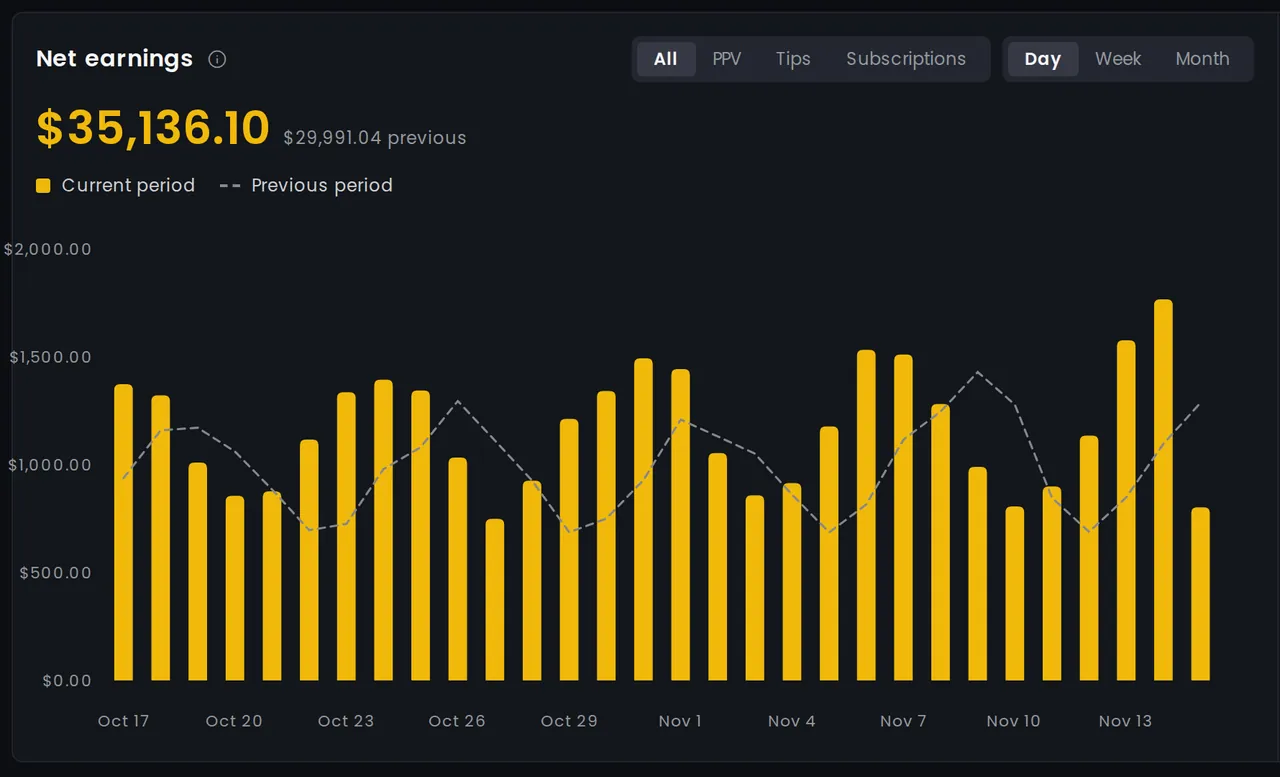
- The earnings chart, by day, week or month, with the previous period as a dashed line. All, PPV, Tips and Subscriptions filter it. Beside it, Earnings breakdown splits the money by channel.
- Earnings by seller: who made each sale. Calypso earnings is what Calypso sold in chat, PPVs and tips. Team sales is what the people on your team sold in chat. Unattributed is money nobody sold in chat, such as new subscriptions, renewals, streams and referrals. It shows — with Not counted yet, because VENUZ can’t split every dollar between the three.
- Fan growth: new subscribers and renewals over time. Ended subscriptions aren’t shown, because OnlyFans doesn’t report them.
- With one creator picked, Transactions lists her payments. With several or all, the Creators table puts them side by side. Click a row to see that creator alone.
- Calypso & Team: how Calypso and your team chatted in the period.
The Calypso and Team tabs#
- Calypso shows what Calypso earned and how it chats: Revenue per message, Unlock rate, Fans chatted, Avg reply time, Pokes sent and more. There, Revenue per paying fan is what Calypso earned divided by the fans who bought from it. What goes into Calypso earnings is explained in What counts as a Calypso sale.
- Team shows what each person on your team sold and how they chat. Each figure is explained in Team results and the Calypso leaderboard.
A — means VENUZ couldn’t confirm the figure. If a number doesn’t match OnlyFans, see Net and gross: why a number differs from OnlyFans.
Where to go next
Overview · 4 min readThe Dashboard at a glanceOverview · 2 min readWhat counts as a Calypso saleTroubleshooting · 2 min readNet and gross: why a number differs from OnlyFans
Did this answer your question?
Sorry about that. What went wrong?
Couldn’t send that. Try again.
Still stuck?
Write to us and a person from the VENUZ team answers. Tell us the creator and what you were trying to do.